February 2025, Release Notes

MESH Works

Engineering - New Features on Web

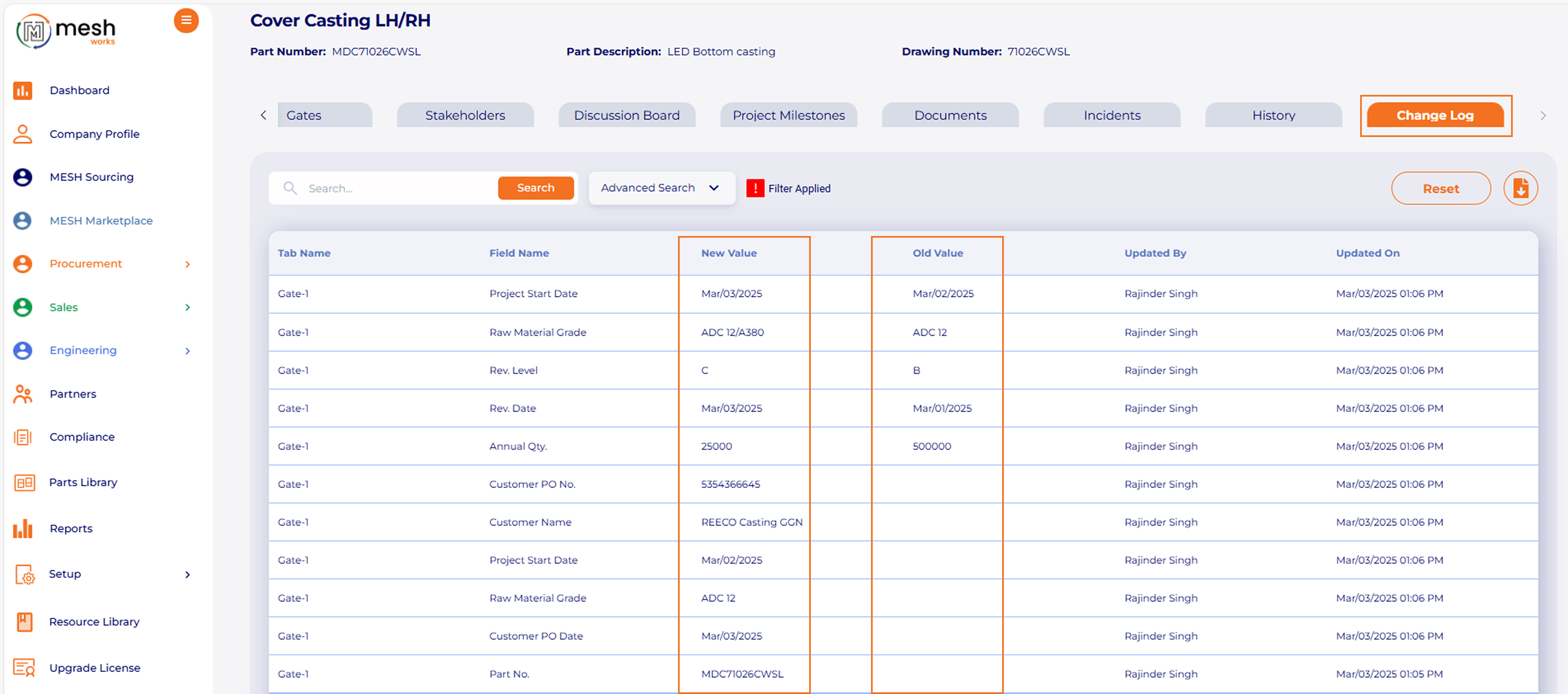
APQP Project- Add a New Feature > Audit Log Tab

Feature Details-

Adding a new feature, such as an “Audit Log,” in APQP projects is essential for a systematic record that tracks all activities, changes, and events within a project. It documents who did what and when, providing a transparent history of project interactions and decisions.

Purpose of Audit Log-

The primary purpose of introducing an Audit Log in APQP projects is to improve traceability, accountability, and compliance. It allows organizations to monitor activities related to product quality and can serve as a safeguard against errors and omissions.
1a1.pngAPQP Project - Added new Feature “Copy APQP project into new project”

Feature Details-

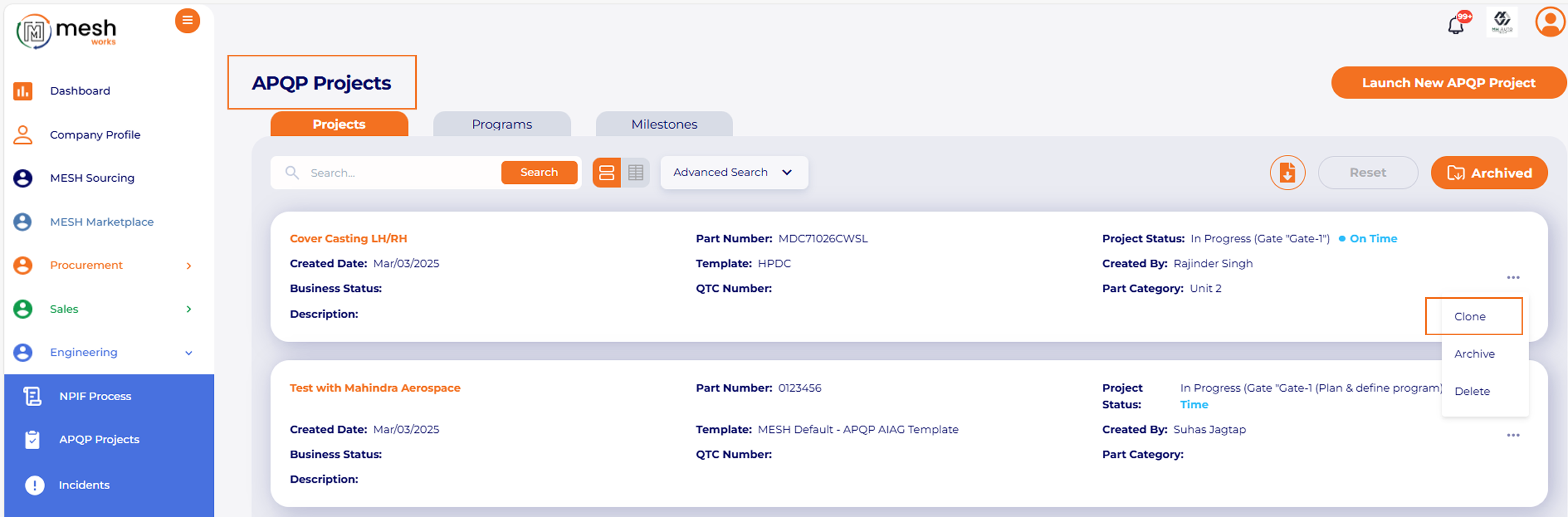
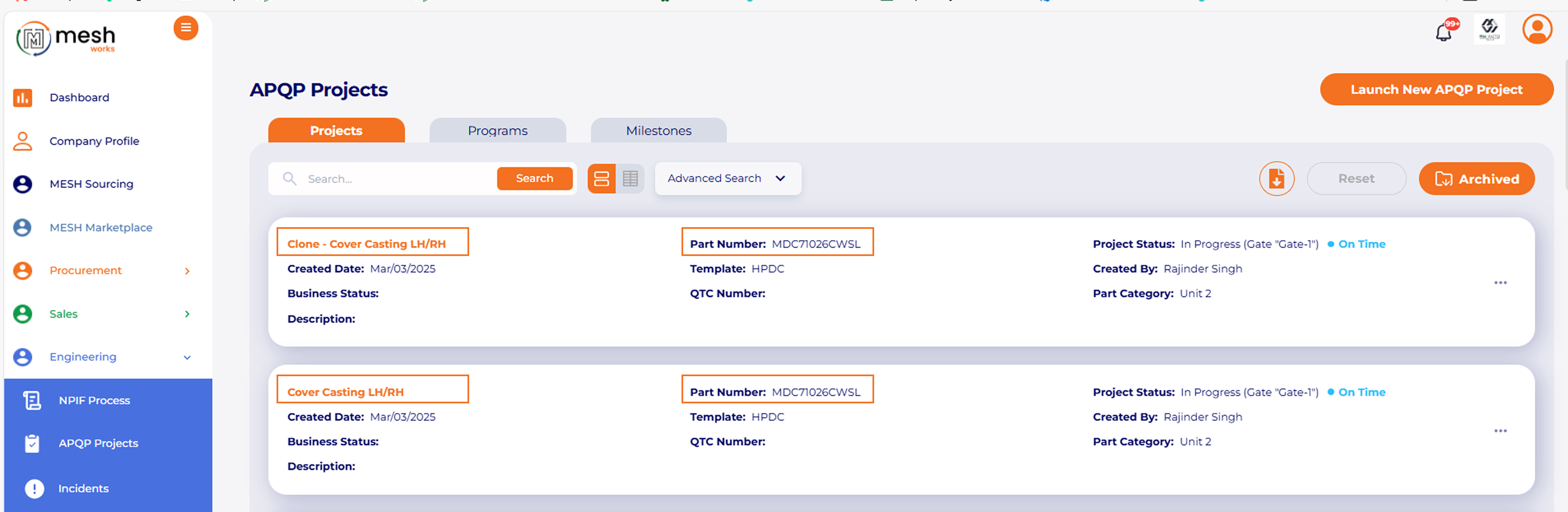
Adding a new feature “Copy APQP Project into New Project” has significantly streamlined the workflow and enhance efficiency in APQP processes. This feature allows users to replicate an existing APQP project, providing a foundation for new initiatives while ensuring consistency in project documentation and structure.
1a2.pngFeature Details-

 The primary aim is to save time, reduce repetitive work, and enhance consistency in project management across different product lines or cycles.
1a3.pngKey Components Replicated with APQP Clone-

1. APQP Project Structure – APQP Phases & Stages

2. Project Milestones & Deliverables

3. Closure and Additional Documents

4. Task List with Detailed Plan with Assigned To, Duration & Predecessors.

5. Part Details & Change Log.
1a4.pngAPQP Project – Flexibility to Mark Closure Document "Not Applicable"

Feature Details-

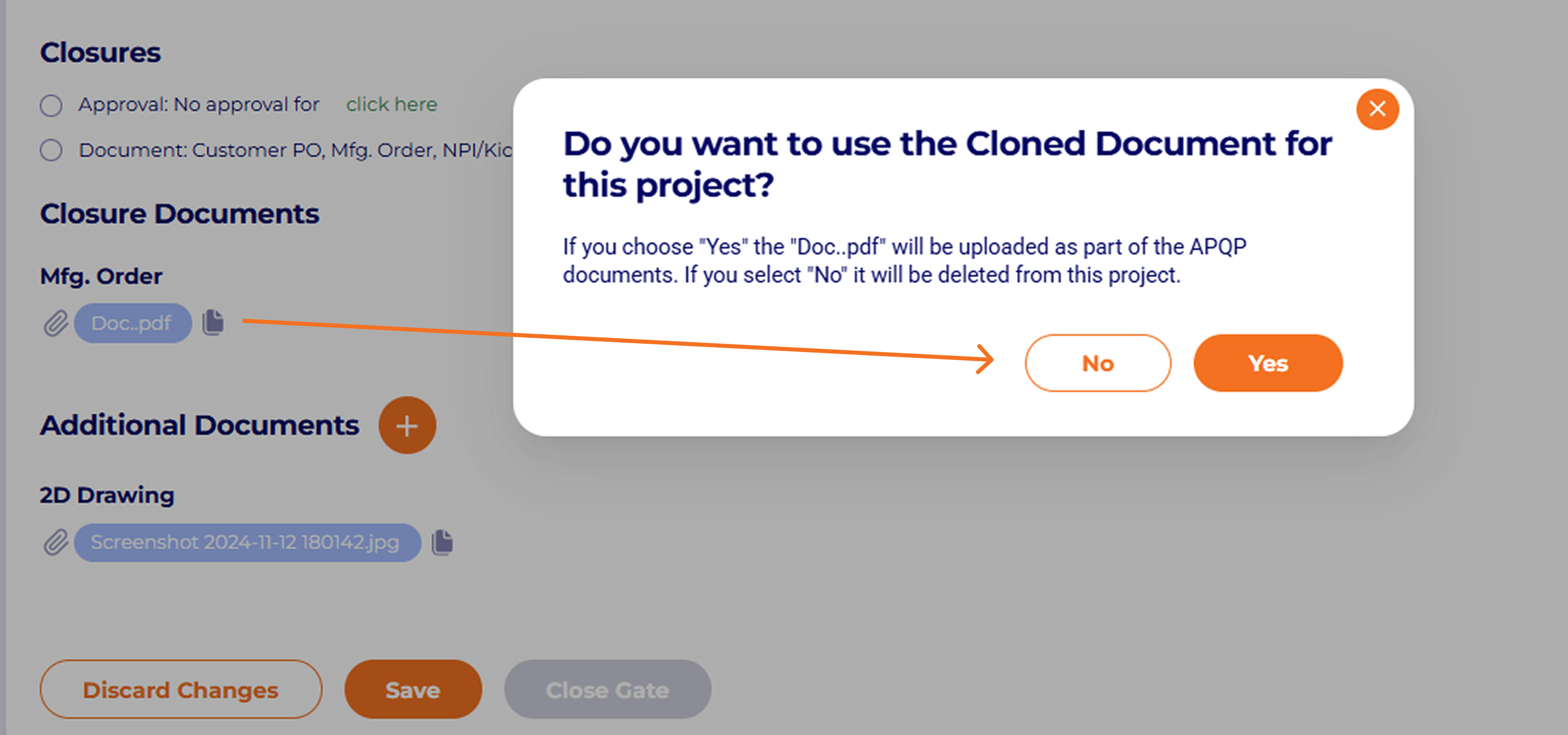
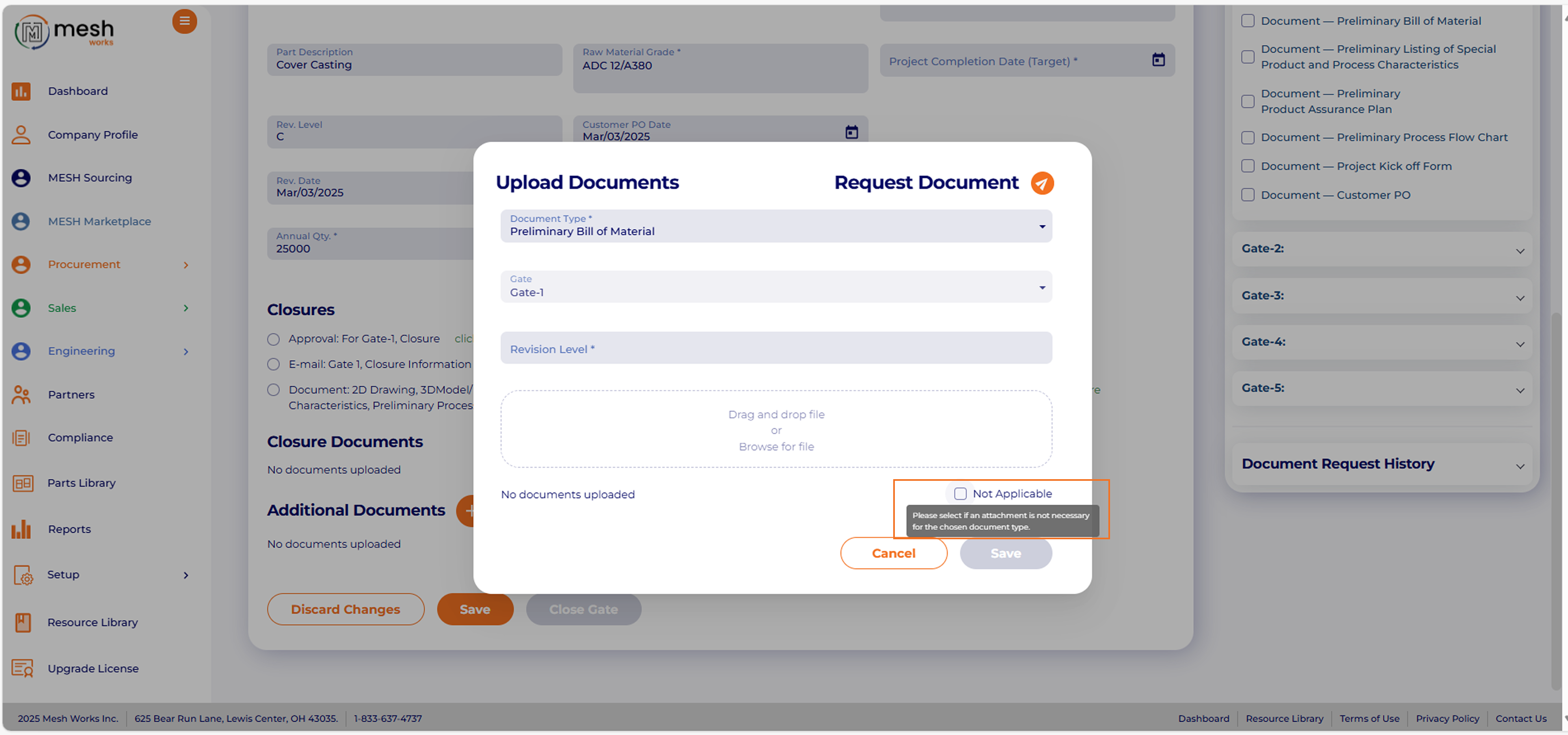
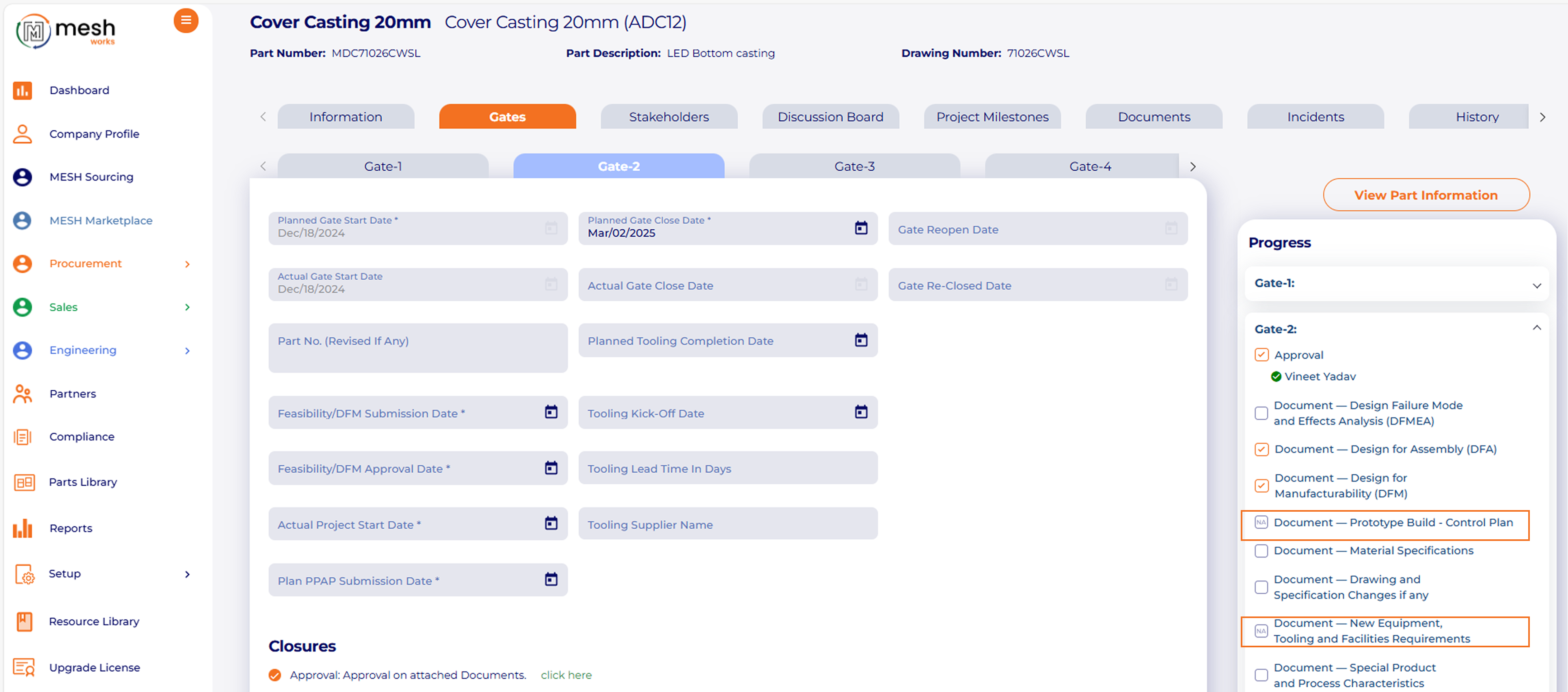
Adding the flexibility to mark closure documents as “Not Applicable” in APQP projects introduces a level of customization that can help teams better manage their documentation and project workflows.
1a5.pngFeature Details-

This flexibility recognizes that not every document element will necessarily apply to every project. By allowing project teams to indicate when certain documents are not applicable, users can easily mark a closure document as N/A through a simple checkbox.
1a6.png

Frequently Asked Questions

Q 1. What is the new Audit Log feature in APQP Projects?

Ans. The Audit Log is a new APQP feature that keeps track of all actions, updates, and changes made within a project. It records who did each action and when, creating a clear activity history for compliance and quality control.

Q 2. Why is the Audit Log important in APQP project management?

Ans. The Audit Log boosts traceability, accountability, and compliance by recording project interactions. It helps teams confirm changes, prevent errors, and keep precise records for audits, customer reviews, and quality checks.

Q 3. What information does the APQP Audit Log capture?

Ans. The Audit Log keeps track of updates like:

- Document uploads or revisions

- Status changes

- Milestone updates

- Task modifications

- User actions and timestamps

This provides complete visibility into the project’s lifecycle.

Q 4. What is the “Copy APQP Project into New Project” feature?

Ans. This feature lets users copy an existing APQP project into a new one. It duplicates the structure, milestones, documents, tasks, and part details. This helps teams start new projects quicker and keep consistency across programs.

Q 5. How does copying an APQP project help teams?

Ans. It significantly reduces repetitive work. Users don’t need to rebuild templates or re-enter project details. This saves time, improves accuracy, and ensures standardization across product lines or customer programs.

Q 6. What components are replicated when cloning an APQP project?

Ans. The following elements are copied automatically:

- APQP phases and stages

- All milestones and deliverables

- Closure and additional documents

- Task lists with duration, owners, and predecessors

- Part-level details and change logs

This creates a complete and consistent project foundation.

Q 7. Can users customize the copied APQP project after cloning?

Ans. Yes. Once the project is cloned, users can change tasks, documents, dates, ownership, or parts as needed. The cloned structure provides a solid foundation.

Q 8. What does “Mark Closure Document as Not Applicable” mean?

Ans. This feature lets users mark specific closure documents as N/A with an easy checkbox. It helps customize APQP requirements based on the type of part, process, customer need, or project scope.

Q 9. Why is the ability to mark documents as “Not Applicable” useful?

Ans. Not all APQP documents are suitable for every project. This feature:

  • Reduces unnecessary work.

  • Improves documentation accuracy.

  • Ensures that relevant documents are prioritized.

  • Supports audit readiness with justified N/A markings.

Q 10. Does marking a document as Not Applicable affect audit compliance?

Ans. Yes, in a positive way. APQP auditors expect clear explanations for missing documents. Marking documents as N/A offers a reason and improves compliance, traceability, and document quality.

Q 11. Can “Not Applicable” markings be changed later?

Ans. Yes. Users can update the N/A status at any time if the project scope, customer requirements, or engineering changes happen.

Q 12. Do cloned APQP projects carry over N/A document settings?

Ans. If the original project has N/A markings, they will be carried forward. However, users can change them in the new project as needed.

Q 13. Does the Audit Log record when a user marks a document as Not Applicable?

Ans. Yes, the Audit Log captures actions related to N/A to ensure complete visibility and proper control of documentation.

Q 14. How do these February 2025 updates improve APQP efficiency?

Ans. Together, these features:

  • Reduce manual work.

  • Improve accuracy.

  • Strengthen documentation integrity.

  • Support faster launches.

  • Improve compliance and audit readiness.

Release Notes
You may also like