April 2025, Release Notes

MESH Works

Engineering - New Features on Web

Feature to Export Document List from Compliance

Feature Details-

This new feature allows users to export a comprehensive list of documents from the compliance module. This enhances reporting, auditing, and record-keeping by providing an easily accessible, shareable document list.

1.pngPurpose-

The primary purpose of the “Feature to Export Document List from Compliance” is to enhance reporting, auditing, and record-keeping by enabling users to export a comprehensive and easily shareable list of documents from the compliance module. This feature provides an accessible way to manage and distribute document information for various compliance-related activities.

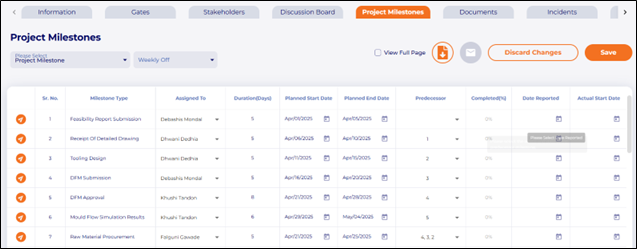
Display task dependencies in the Gantt Chart

Feature Details-

With the addition of predecessors to milestones, users can now visualize milestone linkages and dependencies. Identifying and visualizing these dependencies enables project managers to schedule tasks accurately, understand task relationships, and adjust to setbacks, ensuring successful project execution list.

Purpose-

The purpose of the “Display task dependencies in the Gantt Chart” feature is to provide project managers with a visual representation of task relationships, enabling them to effectively plan, manage, and adapt to changes throughout the project lifecycle, ultimately contributing to successful project execution.

2.png3.pngMandatory Comment Section for "Not Applicable" Documents

Feature Details-

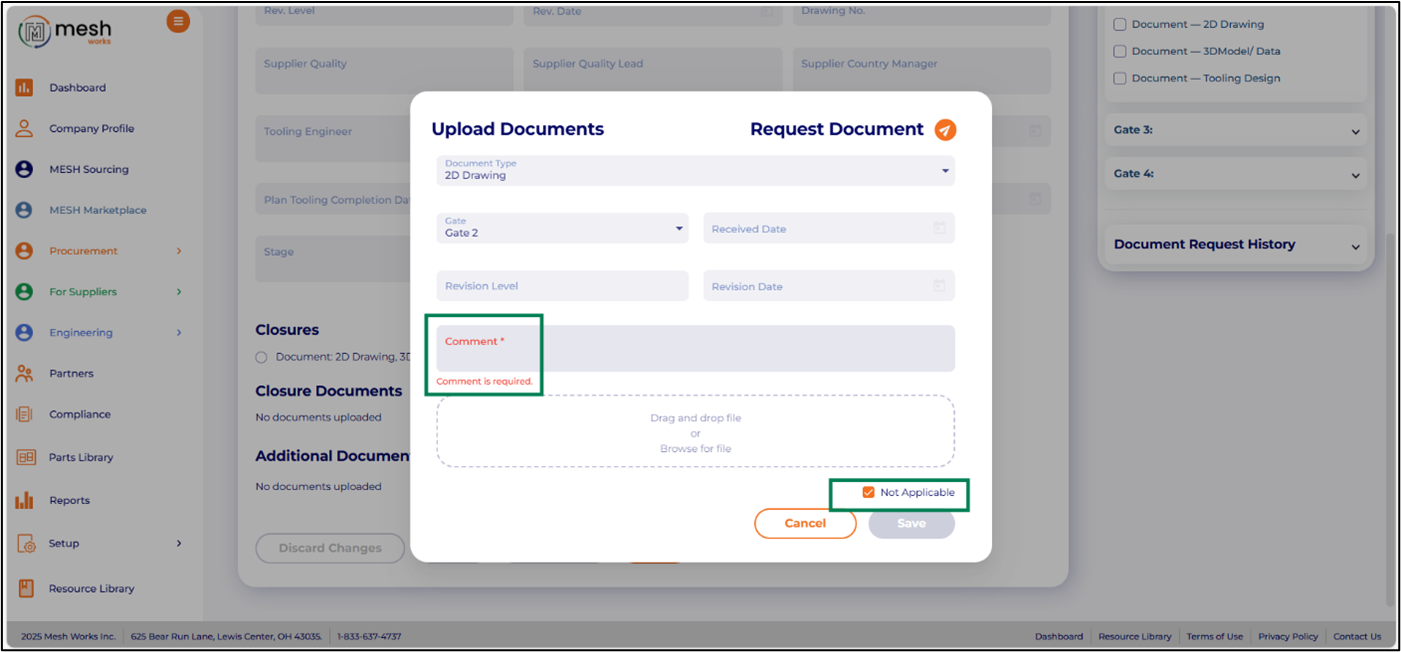
This ensures that a clear explanation is provided for why a document is deemed not applicable, enhancing transparency and accountability. This also helps with audit trails and compliance requirements.
4.pngPurpose-

The purpose of the “Mandatory Comment Section for ‘Not Applicable’ Documents” feature is to enforce clear documentation and accountability when a document is marked as “Not Applicable,” thereby improving transparency, auditability, and compliance within a system or process.

Escalation Framework for Critical Stages-Stakeholders Tab

Feature Details-

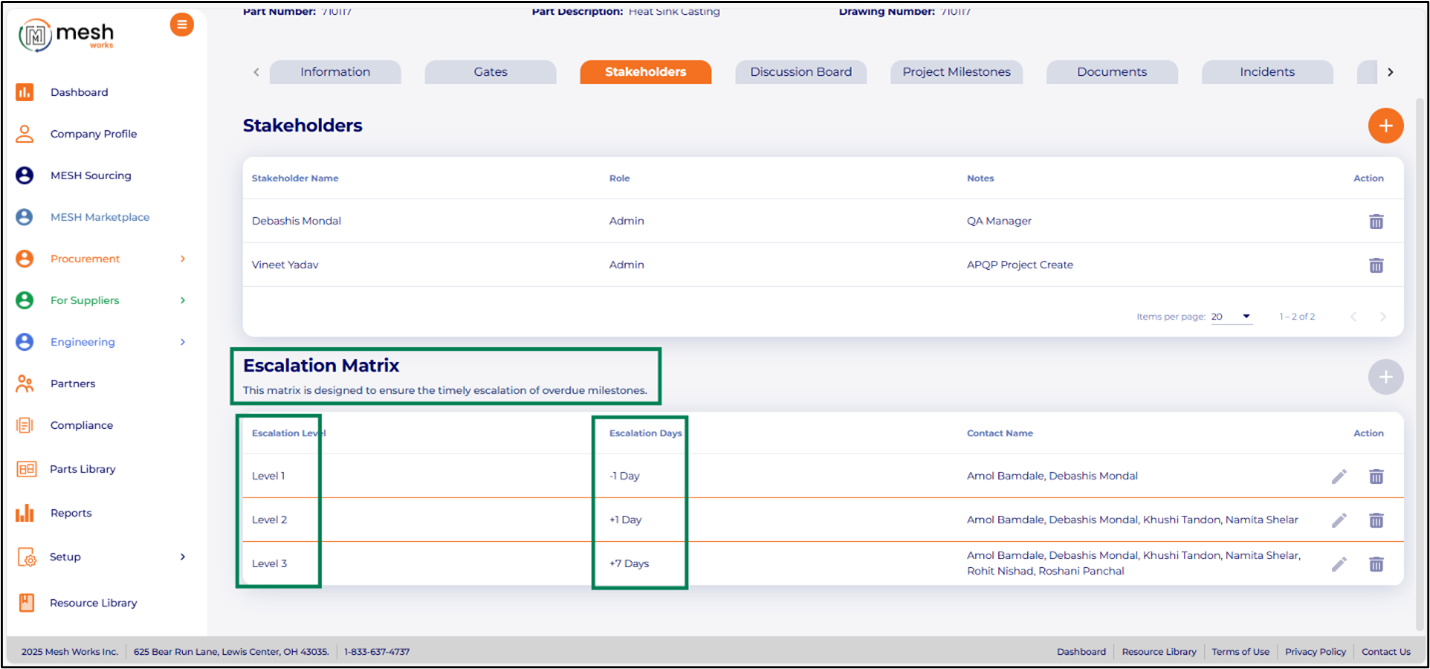
An escalation framework provides a structured approach to managing and resolving issues that arise during critical stages. The framework outlines predefined steps and identifies responsible parties for escalating concerns to higher authority when needed. This process ensures timely decision-making, mitigates risks, and promotes effective communication.
5.pngSRM - New Features on Web

Assign Parts to Suppliers for RFQ Requests

Feature Details-

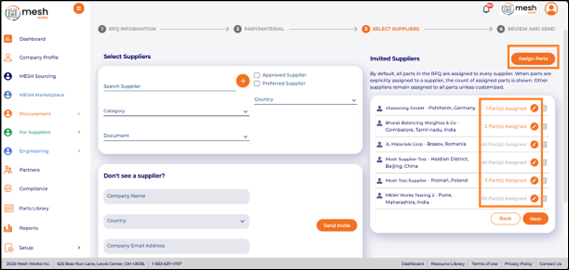
New field has been introduced for buyers during RFP/RFQ creation, allowing them to specify which parts should be shared with individual suppliers or groups of suppliers.

Purpose-

When creating RFQs that span multiple commodity types, users aim to distribute only the relevant parts to each supplier. This approach eliminates the need for suppliers to manually filter through the full BOM to find parts for quotation.
6.pngRaw Material Price Comparison Across Indexes

Feature Details-

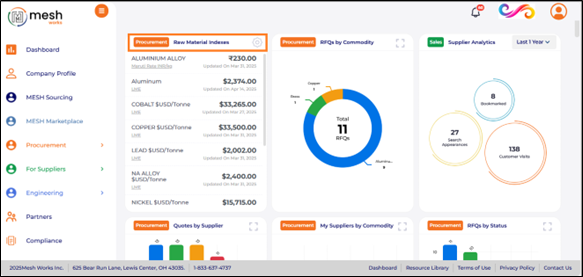
Users can now access live raw material pricing from popular indexes (LME. Platts), view price trend charts, and compare prices across different indexes. For example, a user interested in the cost of zinc can examine and compare prices in the U.S., China, and London markets.
7.pngCreate Private/Anonymous Bids

Feature Details-

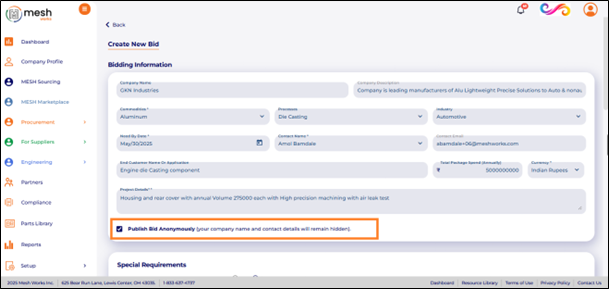
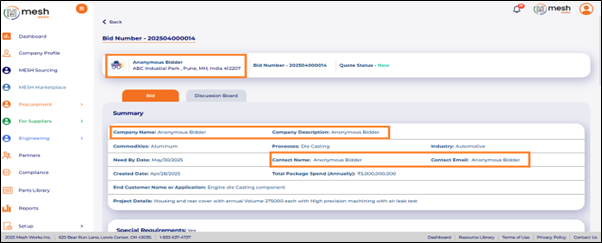
MESH Marketplace now lets buyers stay anonymous — hiding company name and contact details from public view.

Buyers can source confidently, protect their competitive advantage, and control when and how they reveal their identity.

8.pngBuyer View

9.pngSupplier View

Finished Component Template: Empowering Smarter Cost Comparisons

Feature Details-

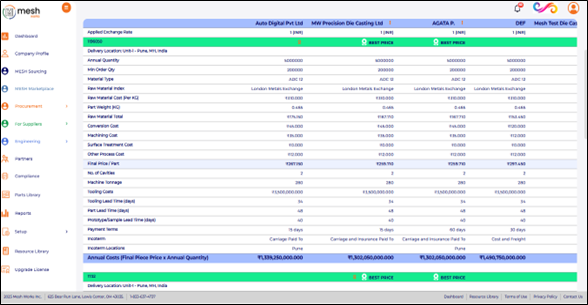
Maximize efficiency and precision with the Finished Component Template. Designed for seamless cost comparison, this tool provides a comprehensive, user-friendly interface that enables quick, data-driven decisions. By simplifying complex cost structures, it helps users compare options easily, assess value.

10.png11.png

Frequently Asked Questions

Q 1. What is the new “Export Document List from Compliance” feature?

Ans. This feature lets users export a complete list of compliance documents into a shareable format, such as Excel. It helps with reporting, prepares for audits, and manages documentation by providing users with quick access to organized compliance records.

Q 2. How does exporting the compliance document list help with audits?

Ans. Auditors often need consolidated documentation. This export feature lets teams create full compliance summaries right away. It saves time and ensures accuracy during audits or internal reviews.

Q 3. Can the compliance document list be shared with external teams?

Ans. Yes. The exported list can be shared with auditors, suppliers, internal quality teams, or leadership to ensure transparency and make compliance tracking easier.

Q 4. What does “Display task dependencies in the Gantt Chart” mean?

Ans. This new feature clearly displays how APQP milestones and tasks are connected. Users can now observe predecessor relationships. This helps project managers schedule accurately and pinpoint critical paths.

Q 5. How do task dependencies improve APQP project planning?

Ans. Dependencies help project managers predict delays, manage timelines, and see which tasks depend on others. This ensures smoother execution and better milestone planning.

Q 6. Why is a mandatory comment required when marking a document as “Not Applicable”?

Ans. The comment requirement explains why a document isn’t necessary. This makes things clearer, removes confusion, and helps meet audit standards with clear documentation.

Q 7. How does the “Not Applicable” comment feature help with compliance?

Ans. Auditors can see why a document is excluded without needing to ask follow-up questions. This lowers compliance risk and improves the credibility of APQP documentation.

Q 8. What is the purpose of the new escalation framework in the Stakeholders tab?

Ans. The escalation framework outlines when and how issues should be raised during important project stages. It ensures prompt decisions, clearer communication, and a lower risk for the project.

Q 9. How does escalation improve APQP or engineering workflows?

Ans. By defining responsible stakeholders and escalation rules, teams can prevent delays, address risks early, and keep accountability throughout the project lifecycle.

Q 10. What does “Assign Parts to Suppliers for RFQ Requests” mean?

Ans. This feature allows buyers to select which specific parts they want each supplier to quote. It stops suppliers from viewing unrelated items and removes the need to sift through entire BOMs.

Q 11. Why is part-specific RFQ assignment important for buyers?

Ans. When RFQs involve multiple commodities or processes, buyers can share only the relevant parts. This improves the supplier experience and boosts quote accuracy.

Q 12. How does part-assignment improve supplier efficiency?

Ans. Suppliers receive only the parts they need to quote. This reduces confusion, saves time, and improves response rates.

Q 13. What is the Raw Material Price Comparison Across Indexes feature?

Ans. Users can now compare live raw material prices, such as LME and Platts, across different regions. This allows sourcing teams to review market trends before awarding RFQs or negotiating prices.

Q 14. How does raw material index comparison help buyers?

Ans. Buyers can check global prices for metals like zinc, aluminum, copper, and steel. This helps ensure that RFQs show fair market rates. It improves cost competitiveness and strengthens negotiation power.

Q 15. What are Private/Anonymous Bids in MESH Marketplace?

Ans. Buyers can now hide their company name, user name, and contact details when posting bids. Suppliers can only see bid requirements and not buyer identities until the buyer decides to reveal them.

Q 16. Why would buyers want to stay anonymous in sourcing?

Ans. Anonymous sourcing helps protect competitive strategies, prevent price inflation, and maintain confidentiality. This is especially important in new supplier markets or during early exploration phases.

Q 17. How do suppliers respond to private bids?

Ans. Suppliers can view bid details and submit quotes. However, they cannot see the buyer’s identity until the buyer decides to share it.

Q 18. What is the Finished Component Template?

Ans. It is a clear template that helps users compare detailed cost breakdowns of finished components. It makes RFQ analysis easier by standardizing cost elements for better comparison.

Q 19. How does the Finished Component Template help sourcing teams?

Ans. By clearly organizing cost drivers like material, machining, tooling, finishing, and logistics, it helps with price comparison, negotiation, and evaluating suppliers.

Q 20. Is the Finished Component Template customizable?

Ans. Yes. Users can adjust fields to fit their commodity, process, or cost needs. This allows for better and more relevant RFQ evaluations.

Release Notes
You may also like